S3Mate
When working with AWS S3, I often receive S3 URLs that are not publicly accessible. These links can't be opened directly in a web browser, and they come in many different formats. For example: https://bucket.s3.amazonaws.com/key or https://s3.region.amazonaws.com/bucket/key
Each time, I had to manually: 1) Figure out which format it was. 2) Extract the bucket and key. 3) Open the AWS Console. 4) Navigate to the correct object. This routine was repetitive and time-consuming.
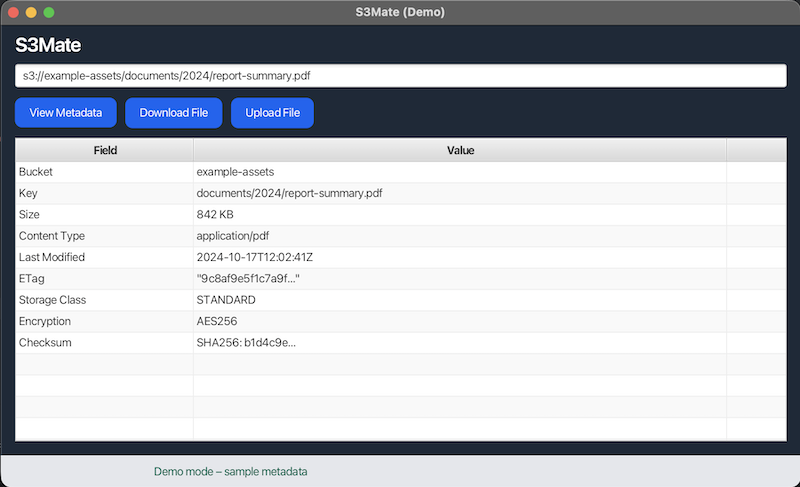
So I built S3Mate. It's a small desktop gadget that lets me paste any S3 URL, automatically resolves the bucket and key, and quickly shows or operates on the object without switching tools.
The application detail, source code and releases can be found at the repository of the gadget at https://github.com/tekichan/s3mate
Even though S3Mate is a small project, I picked up a few useful lessons along the way.
1. Building Native Desktop Apps with jpackage
I learned how to use jpackage to turn a Java application into a native OS application such as .app for MacOS and .exe for Windows. This relieves the need for end users to install Java or deal with command-line arguments.
2. Using Git Tags for Releases
I now use Git tags to mark exact release points in the project:
git push origin <version>
I can remove a release:
git tag -d <version>git push origin :refs/tags/<version>3. Publishing Releases with GitHub Action
To automate distribution, I used softprops/action-gh-release. This GitHub Action uploads build artifacts directly to GitHub Releases.
S3Mate started as a small personal utility, but it gave me an opportunity to learn how to: 1) package Java desktop app. 2) distribute app across various OS platforms. 3) Automation of Github Releases. Most importantly, it saves me time every day when dealing with various kinds of S3 URLs.


Comments